
Windows · Security & Antivirus
Bitdefender TrafficLight for Chrome
Bitdefender TrafficLight - Cutting edge browser protection
Version 1.1.0.9 · by trafficlight.bitdefender.com
Official site: chrome.google.com
About Bitdefender TrafficLight for Chrome
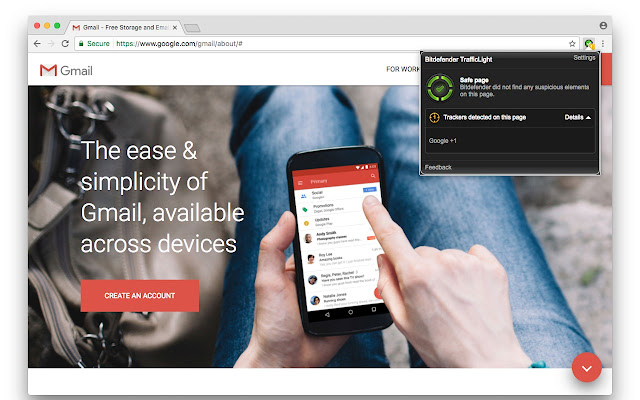
**Bitdefender TrafficLight adds a strong and non-intrusive layer of security to your browsing experience.
TrafficLight is taking the security-while-browsing concept where it belongs: in the browser. This extension will add a strong layer of security over your browsing experience without inducing speed penalties or system resource consumption. Part of the processing is done in the cloud with some intelligent small engines that make various checks on pages you're visiting enabling you to have top notch antiphishing and antimalware protection.**
###Features:
Real Time: TrafficLight scans the pages you visit for malware and phishing attempts each and every time you access them to avoid the threat of legitimate but recently compromised websites.
Precise: TrafficLight won't block an entire website if just some pages within are malicious. Only the potentially harmful elements are blocked, leaving you free to view the rest of the site if you so choose.
Unintrusive: TrafficLight does not add a toolbar to your already-cluttered browser interface. Its interface remains invisible until your input is needed or it's called up with a simple mouse gesture.
Search Results: TrafficLight flags malware and fraudulent websites in search results.
Tracker Revealer: Trackers are code snippets included in web site pages to track and analyze your browsing behavior. TrafficLight quickly identifies and lists them.
**[PACKAGE NOTES](https://github.com/bcurran3/ChocolateyPackages/blob/master/trafficlight-chrome/readme.md)**.
How to install Bitdefender TrafficLight for Chrome
- Click Download — the developer's official website opens in a new tab.
- Download the latest version there and run it. Choose Custom/Advanced where offered, and skip any bundled extras.
- Prefer the command line? With Chocolatey you can install and update it with: choco install bitdefender-trafficlight-for-chrome
- Open Bitdefender TrafficLight for Chrome once it finishes installing.
Frequently asked questions
Is Bitdefender TrafficLight for Chrome free to download?
Yes. The Download button sends you to chrome.google.com, the developer's official site, where Bitdefender TrafficLight for Chrome is available to download. Grabware doesn't host or modify any files.
What is the latest version of Bitdefender TrafficLight for Chrome?
The version listed here is 1.1.0.9, published /Date(1512. The developer's site always has the newest release.
How do I install Bitdefender TrafficLight for Chrome from the command line?
With Chocolatey, run: choco install bitdefender-trafficlight-for-chrome. This installs it from the official source and keeps it updated.
Is Bitdefender TrafficLight for Chrome safe?
Bitdefender TrafficLight for Chrome downloads directly from the developer. As always, scan the installer with your antivirus and choose Custom setup to skip any bundled extras.
Alternatives to Bitdefender TrafficLight for Chrome
More Windows RT 8.1, Windows 8.1, and Windows Server 2012 R2 update: April 2014 (KB2919355)This update is a cumulative update that includes the security updates and the non-security updates for Windows RT 8.1, Windows 8.1, and Windows Server 2012 R2…Security update for Windows kernel: March 10, 2015This security update resolves privately reported vulnerabilities in Windows.Microsoft security advisory: Availability of SHA-2 code signing support for Windows 7 and Windows Server 2008 R2: March 10, 2015The update adds SHA-2 hashing algorithm signing and verification support to Windows 7 and Windows Server 2008 R2
 TeamviewerEmpowering secure remote desktop access and support.
 7-Zip7-Zip is a file archiver with a high compression ratio.
 Foxit PDF ReaderThe industry's most powerful PDF Reader solution.
 MalwarebytesMalwarebytes crushes the latest threats before others even recognize they exist.
 CCleanerThe number-one tool for cleaning your Windows PC.