
Windows · Developer Tools
Hugin
With Hugin you can assemble a mosaic of photographs into a complete immersive panorama, stitch any series of overlapping pictures and much more.
Version 2025.0.1 · by Pablo d Angelo and Hugin Team
Official site: hugin.sourceforge.net
About Hugin
With Hugin you can assemble a mosaic of photographs into a complete immersive panorama, stitch any series of overlapping pictures and much more.
Hugin is an Open Source panorama stitcher and graphical user interface (GUI) for Panorama tools. It also provides a number of additional components and command line tools.
Although Hugin is essentially a panorama stitcher, like other GUI front-ends it has a range of advanced features:
Among the Hugin workflow options, it is possible to correct exposure, Vignetting and White balance between photos; generate HDR, exposure fused or focus stacked output from bracketed photos; or use 16bit and HDR input data natively.
Photos can be digital or scanned, and taken with any kind of camera. A full range of lenses are supported, from simple cameraphones to obscure fisheye lenses. Hugin supports various output projections including a range of spherical, cartographic, and camera projections.
Hugin supports panoramas taken with multiple rows of photos, with or without bracketing. Bracketed photos can be handheld, taken using a DSLR bracketing function, or as consecutive panoramas shot at different EV exposure levels. Hugin can produce successful panoramas shot with cameras that always shoot using auto-exposure and auto-whitebalance.
hugin also supports the use of masks which means that you can exclude parts of images you don't want to appear in your panoramas, or include parts of image you specifically want to appear in your panoramas.
Hugin also uses a separate (background) panorama stitcher. This means that you can render a panorama in the PTBatcherGUI stich window, while working on the next panorama in hugin.
Starting with version 2011.2.0, Hugin is scriptable in Python. The scripting functionality is still in its infancy and requires more development and testing. For now it is available only in Linux and Windows, and currently there is no feedback from the plugin apart from it's success or failure, which is communicated in a dialog. If you're on Linux, you can start hugin from the command line and switch to the window you started it from while the plugin is running - then you'll see any console output it may produce.
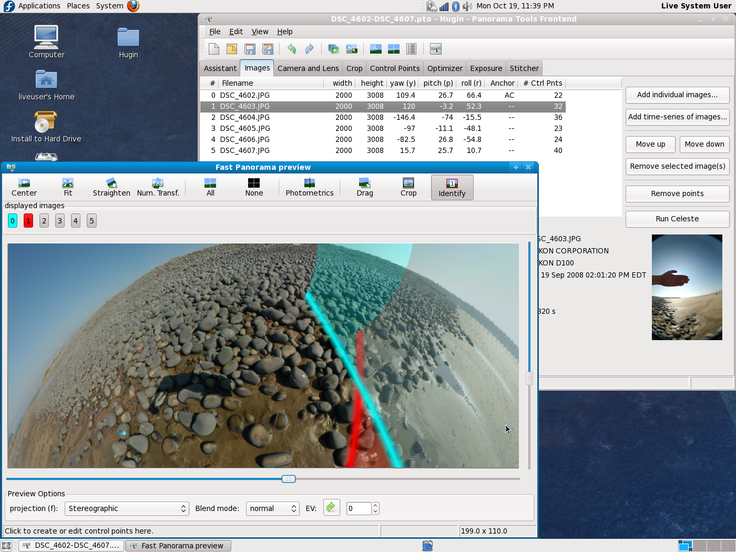.
How to install Hugin
- Click Download — the developer's official website opens in a new tab.
- Download the latest version there and run it. Choose Custom/Advanced where offered, and skip any bundled extras.
- Prefer the command line? With Chocolatey you can install and update it with: choco install hugin
- Open Hugin once it finishes installing.
Frequently asked questions
Is Hugin free to download?
Yes. The Download button sends you to hugin.sourceforge.net, the developer's official site, where Hugin is available to download. Grabware doesn't host or modify any files.
What is the latest version of Hugin?
The version listed here is 2025.0.1, published /Date(1771. The developer's site always has the newest release.
How do I install Hugin from the command line?
With Chocolatey, run: choco install hugin. This installs it from the official source and keeps it updated.
Is Hugin safe?
Hugin downloads directly from the developer. As always, scan the installer with your antivirus and choose Custom setup to skip any bundled extras.
Alternatives to Hugin
More Adobe Acrobat Reader DCView, print, sign, and annotate PDF files.
 Google ChromeChrome is a fast, simple, and secure web browser, built for the modern web.
### Notes
- This package uses Chrome's administrative MSI installer and installs…
Google ChromeChrome is a fast, simple, and secure web browser, built for the modern web.
### Notes
- This package uses Chrome's administrative MSI installer and installs… ChocolateyChocolatey is the package manager for Windows (like apt-get but for Windows)Chocolatey Core ExtensionsHelper functions extending core choco functionality
 March 2014 servicing stack update for Windows 8.1 and Windows Server 2012 R2 (KB2919442)The update fixes some issues in the servicing stack of Windows 8.1 and Windows Server 2012 R2.Chocolatey Compatibility ExtensionExtension package to provide compatibility with older versions of Chocolatey
 Microsoft Visual C++ Redistributable for Visual Studio 2015-2026Run-time components that are required to run C++ applications that are built by using Visual Studio 2015-2026Update for Universal C Runtime in Windows (KB2999226)Update for Universal C Runtime (CRT) in Windows. Before you install this update, check out the prerequisites section.