
Windows · Developer Tools
Insomnia (Native)
A simple utility to temporarily stop your computer from going to sleep.
Version 1.1.0.0 · by David Anson
Official site: dlaa.me
About Insomnia (Native)
---
### [choco://insomnia](choco://insomnia)
To use choco:// protocol URLs, install [(unofficial) choco:// Protocol support ](https://community.chocolatey.org/packages/choco-protocol-support)
---
---
### Looking for the .NET version? Check out the [insomnia-dotnet](https://community.chocolatey.org/packages/insomnia-dotnet) package!
---
# Insomnia
The default power settings for Windows are configured so a computer will go to sleep after 15-30 minutes of inactivity (e.g., no mouse or keyboard input). This is great because a computer that's not being used doesn't need to be running at full power. By letting an idle machine enter sleep mode, the user benefits from a significant reduction in electricity use, heat generation, component wear, etc.. And because sleep preserves the state of everything in memory, it's quick to enter, quick to exit, and doesn't affect your workflow. All the same applications continue running, windows stay open and where they were, and so on. Sleep mode is a *Good Thing*.
But sometimes a computer is busy even though you aren't using the mouse and keyboard; common examples include playing a movie, burning a DVD, streaming music, etc.. In these cases, you do **not** want the machine to go to sleep because you're using it - even though you're not *actually* using it! So most media players and disc burners tell Windows not to go to sleep while they're running. In fact, there's a dedicated API for exactly this purpose: the [SetThreadExecutionState Win32 Function](https://docs.microsoft.com/en-us/windows/win32/api/winbase/nf-winbase-setthreadexecutionstate).
But what about those times when the computer is doing something useful and the relevant program does not suppress the default sleep behavior? It might be downloading a large file, re-encoding a music collection, or backing up the hard drive, for example. In times like this, you don't want the machine to go to sleep **right now**, but are otherwise happy with the default sleep behavior. Unfortunately, the easiest way to temporarily suppress sleeping is to go to Control Panel, open the Power Options page, change the power plan settings, commit them - and then remember to undo everything when you're done. It's not hard; but it's kind of annoying...
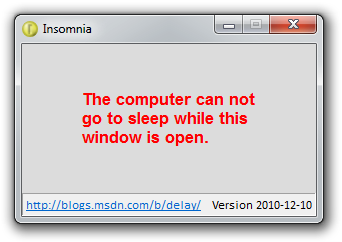
**Insomnia makes it better!** Insomnia is a simple program that calls the `SetThreadExecutionState` API to disable sleep mode for as long as it's running. Closing the Insomnia window immediately returns to whatever sleep mode was in effect before it was run. Yes, it's that simple!
**Aside:** To be clear, the *display* can still go to sleep and power off - it's just sleep for the *computer* that is blocked. Similarly, if you *tell* the machine to go to sleep by hitting the power button, it will still do so.
## Package Parameters
* `/NoShim` - Opt out of creating a GUI shim.
*…
How to install Insomnia (Native)
- Click Download — the developer's official website opens in a new tab.
- Download the latest version there and run it. Choose Custom/Advanced where offered, and skip any bundled extras.
- Prefer the command line? With Chocolatey you can install and update it with: choco install insomnia-native
- Open Insomnia (Native) once it finishes installing.
Frequently asked questions
Is Insomnia (Native) free to download?
Yes. The Download button sends you to dlaa.me, the developer's official site, where Insomnia (Native) is available to download. Grabware doesn't host or modify any files.
What is the latest version of Insomnia (Native)?
The version listed here is 1.1.0.0, published /Date(1664. The developer's site always has the newest release.
How do I install Insomnia (Native) from the command line?
With Chocolatey, run: choco install insomnia-native. This installs it from the official source and keeps it updated.
Is Insomnia (Native) safe?
Insomnia (Native) downloads directly from the developer. As always, scan the installer with your antivirus and choose Custom setup to skip any bundled extras.
Alternatives to Insomnia (Native)
More Adobe Acrobat Reader DCView, print, sign, and annotate PDF files.
 Google ChromeChrome is a fast, simple, and secure web browser, built for the modern web.
### Notes
- This package uses Chrome's administrative MSI installer and installs…
Google ChromeChrome is a fast, simple, and secure web browser, built for the modern web.
### Notes
- This package uses Chrome's administrative MSI installer and installs… ChocolateyChocolatey is the package manager for Windows (like apt-get but for Windows)Chocolatey Core ExtensionsHelper functions extending core choco functionality
 March 2014 servicing stack update for Windows 8.1 and Windows Server 2012 R2 (KB2919442)The update fixes some issues in the servicing stack of Windows 8.1 and Windows Server 2012 R2.Chocolatey Compatibility ExtensionExtension package to provide compatibility with older versions of Chocolatey
 Microsoft Visual C++ Redistributable for Visual Studio 2015-2026Run-time components that are required to run C++ applications that are built by using Visual Studio 2015-2026Update for Universal C Runtime in Windows (KB2999226)Update for Universal C Runtime (CRT) in Windows. Before you install this update, check out the prerequisites section.