
Windows · Security & Antivirus
SoftPerfect Network Scanner
SoftPerfect Network Scanner is a free multi-threaded IPv4/IPv6 scanner with a modern interface and many advanced features.
Version 26.9.0 · by SoftPerfect
Official site: softperfect.com
About SoftPerfect Network Scanner
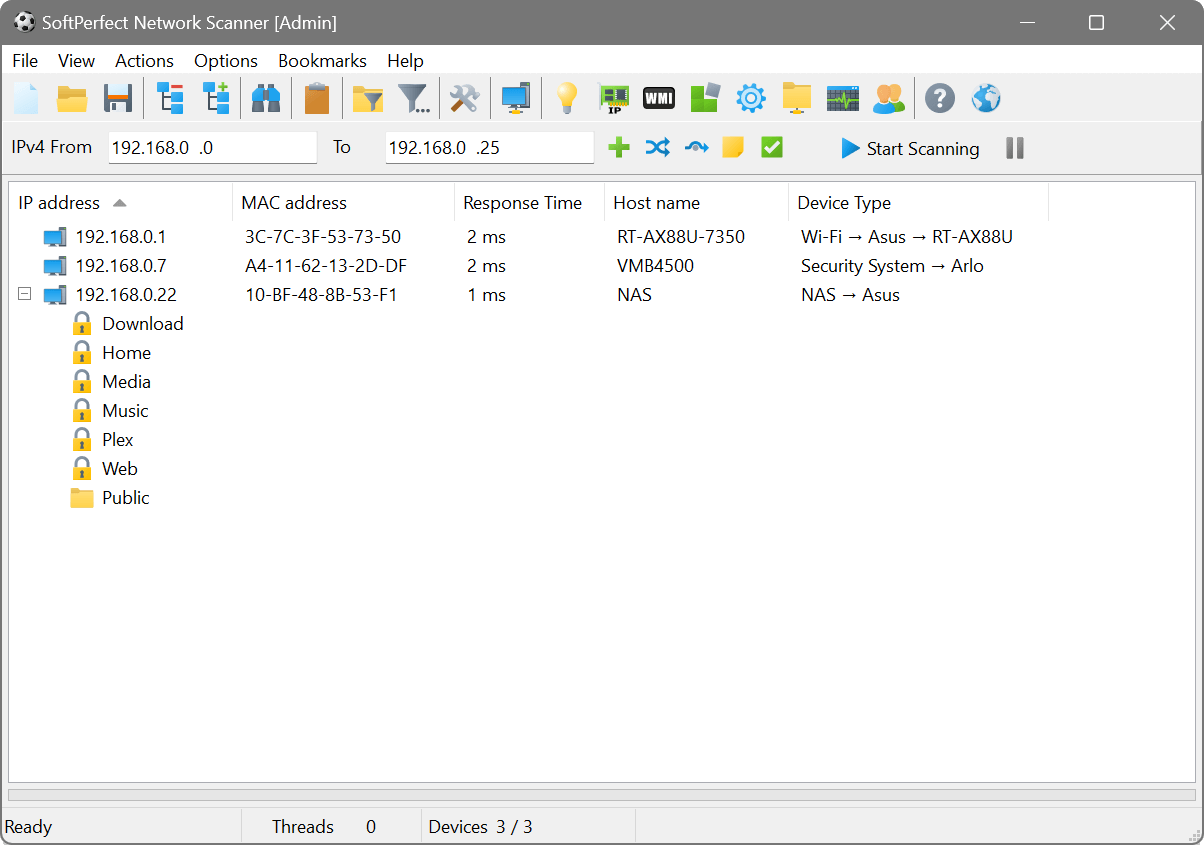
This fast, highly configurable IPv4/IPv6 scanner can streamline many of your network support procedures. Its well-designed interface, light weight and portability coupled with an extensive range of options and advanced features make SoftPerfect Network Scanner an invaluable tool, whether you are a professional system administrator, someone providing occasional network maintenance, or a general user interested in computer security.
SoftPerfect Network Scanner can ping computers, scan ports, discover shared folders and retrieve practically any information about network devices via WMI, SNMP, HTTP, SSH and PowerShell. It also scans for remote services, registry, files and performance counters; offers flexible filtering and display options and exports NetScan results to a variety of formats from XML to JSON.
## Key Features
- **IPv4 and IPv6 Support**: Fully supports both IPv4 and IPv6 discovery.
- **Ping Sweep**: Performs a ping sweep and displays live devices.
- **Hardware MAC-Addresses Detection**: Detects hardware MAC-addresses, even across routers.
- **Shared Folders Discovery**: Discovers writable and hidden shared folders.
- **IP Address Detection**: Detects internal and external IP addresses.
- **System Information Retrieval**: Retrieves any system information via WMI, remote registry, file system and service manager.
- **Port Scanning**: Scans for listening TCP ports, some UDP and SNMP services.
- **User and System Information**: Retrieves currently logged-on users, configured user accounts, uptime, etc.
- **Remote Command Execution**: Supports remote SSH, PowerShell and VBScript command execution.
- **Third Party Application Integration**: Launches external third party applications.
- **Network Management Tools**: Supports Wake-On-LAN, remote shutdown and sending network messages.
- **Data Export**: Exports results to HTML, XML, JSON, CSV and TXT.
- **Nmap Integration**: Integrates with Nmap for OS discovery, vulnerability tests, and much more.
- **Portability**: Can be run from a USB flash drive without installation.
## Package Note
This package supersedes the `netscan32` and `netscan64` packages. You should consider uninstalling the deprecated packages to prevent any confusion.
How to install SoftPerfect Network Scanner
- Click Download — the developer's official website opens in a new tab.
- Download the latest version there and run it. Choose Custom/Advanced where offered, and skip any bundled extras.
- Prefer the command line? With Chocolatey you can install and update it with: choco install softperfect-network-scanner
- Open SoftPerfect Network Scanner once it finishes installing.
Frequently asked questions
Is SoftPerfect Network Scanner free to download?
Yes. The Download button sends you to softperfect.com, the developer's official site, where SoftPerfect Network Scanner is available to download. Grabware doesn't host or modify any files.
What is the latest version of SoftPerfect Network Scanner?
The version listed here is 26.9.0, published /Date(1788. The developer's site always has the newest release.
How do I install SoftPerfect Network Scanner from the command line?
With Chocolatey, run: choco install softperfect-network-scanner. This installs it from the official source and keeps it updated.
Is SoftPerfect Network Scanner safe?
SoftPerfect Network Scanner downloads directly from the developer. As always, scan the installer with your antivirus and choose Custom setup to skip any bundled extras.
Alternatives to SoftPerfect Network Scanner
More Windows RT 8.1, Windows 8.1, and Windows Server 2012 R2 update: April 2014 (KB2919355)This update is a cumulative update that includes the security updates and the non-security updates for Windows RT 8.1, Windows 8.1, and Windows Server 2012 R2…Security update for Windows kernel: March 10, 2015This security update resolves privately reported vulnerabilities in Windows.Microsoft security advisory: Availability of SHA-2 code signing support for Windows 7 and Windows Server 2008 R2: March 10, 2015The update adds SHA-2 hashing algorithm signing and verification support to Windows 7 and Windows Server 2008 R2
 TeamviewerEmpowering secure remote desktop access and support.
 7-Zip7-Zip is a file archiver with a high compression ratio.
 Foxit PDF ReaderThe industry's most powerful PDF Reader solution.
 MalwarebytesMalwarebytes crushes the latest threats before others even recognize they exist.
 CCleanerThe number-one tool for cleaning your Windows PC.