
Windows · Security & Antivirus
SolarWinds Backup Manager
Protect Your Users' Data with Sophisticated Backup and Rapid Disaster Recovery
Version 26.7.0.26287 · by SolarWinds MSP
Official site: solarwindsmsp.com
About SolarWinds Backup Manager
## SolarWinds Backup Manager (Install)
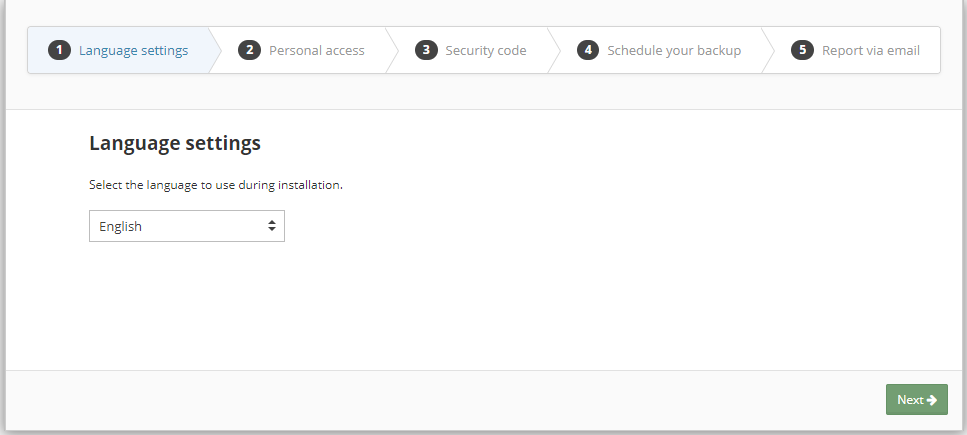
### Protect Your Users’ Data with Sophisticated Backup and Rapid Disaster Recovery
Data loss can cause serious financial hardships for a company, and system downtime can cripple productivity, preventing a business from providing good service to customers. That’s why it’s critical to be prepared with the right technology.
SolarWinds® Remote Monitoring & Management provides a hybrid cloud backup and disaster recovery feature, allowing you to help quickly restore business continuity after a disaster. Our True Delta™ technology helps to reduce backup times by storing changes instead of full files. This allows you to back up files quickly and frequently, helping you to prevent losing data due to a disaster. The backup and recovery feature also uses strong encryption both in transit and at rest, so you can breathe more easily knowing that data is kept safe.
### Experience the Hybrid Cloud
* **Best of both worlds:** Leverage a hybrid cloud architecture that gives you the control and speed of on-premises backup combined with the convenience and added redundancy of a cloud-based approach.
* **Back up a number of devices at almost any level:** Back up everything, including workstations, servers, and even virtual machines and servers. Additionally, backups can be set for anything from individual files to applications all the way to full systems.
### Back Up Fast, Recover Fast
* **Fast backup:** Take advantage of our True Delta technology, which backs up changes rather than full files. This helps to reduce the time it takes to run the backup process, allowing you to back up more frequently.
* **Fast recovery:** Get rapid recovery after a disaster using our hybrid cloud architecture that restores from either cloud-based or local copies—whichever is faster.
* **Bare metal recovery:** Restore to a bare metal state using nothing more than a bootable USB drive or CD-ROM.
* **Automatic updates:** Remote Monitoring & Management can automatically update a standby virtual server after the completion of each live server backup.
* **Minimum resource usage:** All backups and restores are lightweight, keeping resource drain to a minimum.
* **Bandwidth throttling:** Restrict upload and download bandwidth during a user-defined backup window.
* **Standby image backup:** Automatically create a local .VHD/X file of your backup selections during each scheduled backup.
### Leverage Enterprise-Grade Features
* **Virtual machine support:** Back up your virtual environments with host-level VMware® and Hyper-V® backups. You can restore to an existing or alternate virtual environment.
* **Ultra secure:** Leverage AES 256 or 448-bit Blowfish encryption to help with keeping data safe on-premises, during transfers,…
How to install SolarWinds Backup Manager
- Click Download — the developer's official website opens in a new tab.
- Download the latest version there and run it. Choose Custom/Advanced where offered, and skip any bundled extras.
- Prefer the command line? With Chocolatey you can install and update it with: choco install solarwinds-backup-manager
- Open SolarWinds Backup Manager once it finishes installing.
Frequently asked questions
Is SolarWinds Backup Manager free to download?
Yes. The Download button sends you to solarwindsmsp.com, the developer's official site, where SolarWinds Backup Manager is available to download. Grabware doesn't host or modify any files.
What is the latest version of SolarWinds Backup Manager?
The version listed here is 26.7.0.26287, published /Date(1792. The developer's site always has the newest release.
How do I install SolarWinds Backup Manager from the command line?
With Chocolatey, run: choco install solarwinds-backup-manager. This installs it from the official source and keeps it updated.
Is SolarWinds Backup Manager safe?
SolarWinds Backup Manager downloads directly from the developer. As always, scan the installer with your antivirus and choose Custom setup to skip any bundled extras.
Alternatives to SolarWinds Backup Manager
More Windows RT 8.1, Windows 8.1, and Windows Server 2012 R2 update: April 2014 (KB2919355)This update is a cumulative update that includes the security updates and the non-security updates for Windows RT 8.1, Windows 8.1, and Windows Server 2012 R2…Security update for Windows kernel: March 10, 2015This security update resolves privately reported vulnerabilities in Windows.Microsoft security advisory: Availability of SHA-2 code signing support for Windows 7 and Windows Server 2008 R2: March 10, 2015The update adds SHA-2 hashing algorithm signing and verification support to Windows 7 and Windows Server 2008 R2
 TeamviewerEmpowering secure remote desktop access and support.
 7-Zip7-Zip is a file archiver with a high compression ratio.
 Foxit PDF ReaderThe industry's most powerful PDF Reader solution.
 MalwarebytesMalwarebytes crushes the latest threats before others even recognize they exist.
 CCleanerThe number-one tool for cleaning your Windows PC.