
Windows · Security & Antivirus
Stickies
A computer screen version of sticky notes.
Version 10.2.1 · by Tom Revell
Official site: zhornsoftware.co.uk
About Stickies
Stickies is a PC utility written to try to cut down on the number of yellow notes stuck to the monitor.
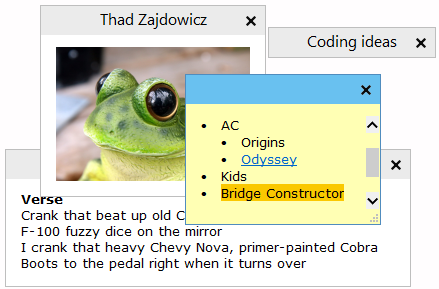
## Main features
* Once on screen, notes will remain where placed until closed, even through reboots
* Stickies appearance can be customised; fonts, colours and buttons may be changed, and styles saved. Notes can be resized.
* Stickies can store text or images
* Stickies can be hidden for a certain period, until a specified date and time, or to wake every day, week or month, to act as reminders.
* Stickies can have alarms set to ensure you notice them at a point you choose
* International language, Unicode and RTL text support
* Stickies can snap to each other and to the sides of the screen to keep them neatly lined up
* Stickies can be attached to an application, web site, document or folder so they only show when it's on screen
* Stickies can be transferred from one machine to another either over a TCP/IP network connection, or by using an SMTP mail server or MAPI client:
* Hierarchical friends list, which may be automatically transferred from other friends
* Stickies works with Windows 7, Windows 8 and Windows 10
* Stickies is small and simple, it writes to a database file, and does not alter the registry
* AD network administrators can use Group Policy to control settings
* API to allow integration with other applications
* ...and Stickies is completely free!
#### Malware free
To save costs, the author of this freeware does not purchase a signing certificate for the compiled binaries which results in the occasional antimalware scanner flagging Stickies as "malware". The author [attests that Stickies does not contain any virus or malware](https://www.zhornsoftware.co.uk/support/kb.pl?q=00097), and has been publishing the software for 25+ years. Ultimately, *you* have to decide for yourself whether to trust the author's claim. Even so, your protection software could delete/quarantine the program without consultation, and there is nothing this package nor Chocolatey can do to prevent that.
How to install Stickies
- Click Download — the developer's official website opens in a new tab.
- Download the latest version there and run it. Choose Custom/Advanced where offered, and skip any bundled extras.
- Prefer the command line? With Chocolatey you can install and update it with: choco install stickies
- Open Stickies once it finishes installing.
Frequently asked questions
Is Stickies free to download?
Yes. The Download button sends you to zhornsoftware.co.uk, the developer's official site, where Stickies is available to download. Grabware doesn't host or modify any files.
What is the latest version of Stickies?
The version listed here is 10.2.1, published /Date(1741. The developer's site always has the newest release.
How do I install Stickies from the command line?
With Chocolatey, run: choco install stickies. This installs it from the official source and keeps it updated.
Is Stickies safe?
Stickies downloads directly from the developer. As always, scan the installer with your antivirus and choose Custom setup to skip any bundled extras.
Alternatives to Stickies
More Windows RT 8.1, Windows 8.1, and Windows Server 2012 R2 update: April 2014 (KB2919355)This update is a cumulative update that includes the security updates and the non-security updates for Windows RT 8.1, Windows 8.1, and Windows Server 2012 R2…Security update for Windows kernel: March 10, 2015This security update resolves privately reported vulnerabilities in Windows.Microsoft security advisory: Availability of SHA-2 code signing support for Windows 7 and Windows Server 2008 R2: March 10, 2015The update adds SHA-2 hashing algorithm signing and verification support to Windows 7 and Windows Server 2008 R2
 TeamviewerEmpowering secure remote desktop access and support.
 7-Zip7-Zip is a file archiver with a high compression ratio.
 Foxit PDF ReaderThe industry's most powerful PDF Reader solution.
 MalwarebytesMalwarebytes crushes the latest threats before others even recognize they exist.
 CCleanerThe number-one tool for cleaning your Windows PC.