
Windows · Chat & Communication
(unofficial) choco:// Protocol support
Implements installing of Chocolatey packages from the web using choco:// Protocol
Version 0.2 · by bcurran3
Official site: github.com
About (unofficial) choco:// Protocol support
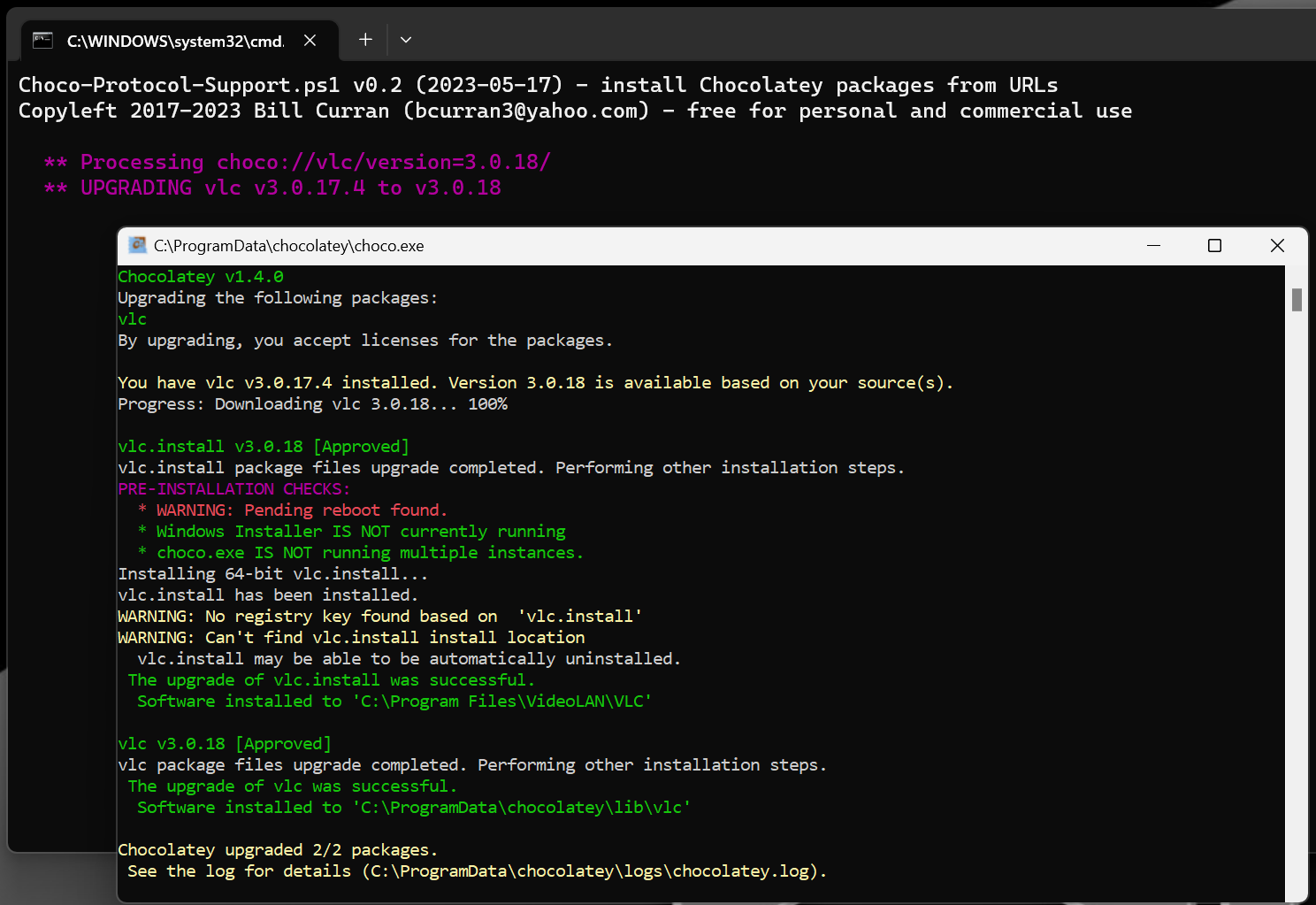
# Implements installing of Chocolatey packages from the web using choco:// Protocol.
### WHO IS THIS FOR?
**choco-protocol-support** is designed for those who aren't comfortable with the Command Prompt or just don't like to type much. **choco-protocol-support** allows you to install Chocolatey packages by simply clicking choco:// URLs in your web browser. **choco-protocol-support** is also useful for support professionals who know the difficulty of getting end users to type in commands correctly. Now you can give end users a URL via e-mail or corporate software webpage to click and have a Chocolatey package installed!
If you like the convienance of this package, you should also check out [Install Chocolatey Packages from your Web Browser](https://chocolatey.org/packages/choco-install-packages-from-web-winconfig) which is very similar in concept as well as [(unofficial) Chocolatey Shortcuts (Config)](https://chocolatey.org/packages/choco-shortcuts-winconfig). All three of these make installing Chocolatey packages very user friendly.
### HOW DOES IT WORK?
**choco-protocol-support** configures Windows to use choco://packagename URLs and pass them along to **choco-protocol-support.ps1** which then processes the URL and runs "choco install" or "choco upgrade" to install or upgrade the package. [This ability will be baked natively into a future version of Chocolatey](https://github.com/chocolatey/choco/issues/1680) and then this package can be retired.
### USAGE INSTRUCTIONS:
Just click a choco://packagename URL on a web page and the package will install after one or two approval clicks.
Browser examples: [Chrome](https://cdn.staticaly.com/gh/bcurran3/ChocolateyPackages/master/choco-protocol-support/choco-protocol-support_chrome_example.png) | [Firefox](https://cdn.staticaly.com/gh/bcurran3/ChocolateyPackages/master/choco-protocol-support/choco-protocol-support_firefox_example.png) | [Opera](https://cdn.staticaly.com/gh/bcurran3/ChocolateyPackages/master/choco-protocol-support/choco-protocol-support_opera_example.png)
### **Easy peasy, Chocolateasy!**
### INTRODUCING THE FIRST choco:// URLS ON THE INTERNET:
(AKA Other fine 3rd party Chocolatey utilities by BCURRAN3)
[choco://instchoco](choco://instchoco) - (unofficial) InstChoco - The ULTIMATE Chocolatey and Chocolatey packages (re)installer!
[choco://choco-package-list-backup](choco://choco-package-list-backup) - (unofficial) Choco Package List Backup to Local and Cloud
[choco://choco-cleaner](choco://choco-cleaner) - (unofficial) Choco Cleaner
[choco://choco-upgrade-all-at](choco://choco-upgrade-all-at) - (unofficial) Choco Upgrade All at
[choco://choco-shortcuts-winconfig](choco://choco-shortcuts-winconfig) - (unofficial) Chocolatey Shortcuts…
How to install (unofficial) choco:// Protocol support
- Click Download — the developer's official website opens in a new tab.
- Download the latest version there and run it. Choose Custom/Advanced where offered, and skip any bundled extras.
- Prefer the command line? With Chocolatey you can install and update it with: choco install unofficial-choco-protocol-support
- Open (unofficial) choco:// Protocol support once it finishes installing.
Frequently asked questions
Is (unofficial) choco:// Protocol support free to download?
Yes. The Download button sends you to github.com, the developer's official site, where (unofficial) choco:// Protocol support is available to download. Grabware doesn't host or modify any files.
What is the latest version of (unofficial) choco:// Protocol support?
The version listed here is 0.2, published /Date(1684. The developer's site always has the newest release.
How do I install (unofficial) choco:// Protocol support from the command line?
With Chocolatey, run: choco install unofficial-choco-protocol-support. This installs it from the official source and keeps it updated.
Is (unofficial) choco:// Protocol support safe?
(unofficial) choco:// Protocol support downloads directly from the developer. As always, scan the installer with your antivirus and choose Custom setup to skip any bundled extras.
Alternatives to (unofficial) choco:// Protocol support
More Zoom Client for MeetingsZoom unifies cloud video conferencing, simple online meetings, group messaging, and a software-defined conference room solution into one easy-to-use platform.
 Microsoft Teams Classic Desktop App (Machine-Wide Install)Microsoft Teams helps your team work better together. It's one app that brings your team's conversations, meetings, files and notes together into a single place…
 Notepad++Notepad++ is a free (as in "free speech" and also as in "free beer") source code editor and Notepad replacement that supports several languages.Microsoft Teams Classic Desktop AppMicrosoft Teams helps your team work better together. It's one app that brings your team's conversations, meetings, files and notes together into a single place…
 WinRARA powerful archive manager
 Slack for WindowsSlack for Windows
 Adobe Shockwave Player (Final Version - EOL)Displays Web content that has been created by Adobe Director
 SkypeSkype - VOIP