
Windows · Security & Antivirus
Winflector
otc server for remote application execution
Version 4.0.2 · by OTC S.A.
Official site: winflector.com
About Winflector
## Winflector (Install)

Winflector is innovative, secure and easy to use software, which allows effective sharing and remote execution of choosen applications through local and wide area networks. Its basic features include:
* low costs: applications executed remotely over a network
* works over LAN, Internet, as well as dedicated connection, also at low throughput
* application is executed on a main server, while a remote user accesses only its windows
* the application server administrator decides which program(s) to share
Winflector allows sharing of any Windows application, which can be executed by remote users without any modification of the application code, preserving its original appearance and functionality.
Thanks to Winflector server, the applications are executed only on the central machine, while the remote users, using a lightweight client supporting Linux, Windows, Android and HTML5 browser access them the same way they would do locally. Winflector does not use Remote Desktop Services (earlier Windows Terminal Services), RemoteApp or Citrix products (XenApp).
Winflector Console is a special Winflector version designed exclusively for 32-bit text applications executed in the Windows console environment. The Winflector Console is the optimal, simple and low-cost solution for those who plan on using console applications only.
Remote desktop - is it the best solution?
A business application user needs to access applications and their functionality. In this case it is preferable to use a Winflector server, which enables the Windows application to be accessed as if they were locally displayed on the user's desktop. This way, a middle layer of remote desktop is eliminated, along with its increased bandwith usage and heavy interface, which makes it harder to use the actual application and increases the server load. Another advantage of this solution is limiting user access only to application functionality, hence increasing the server security.
Remote desktop is a good solution when one wishes to remotely administrate the computer. In this case, it is efficient to use VNC software or single-user Terminal Services, which is included in the operating system.
This is a fully functional version of Winflector software for two concurrent workstations for free.
[Winflector Client](https://chocolatey.org/packages/winflector-client)
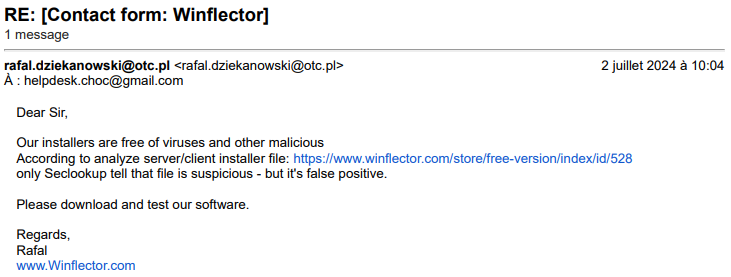
# False Positive
[](https://chocolatey.org/packages/winflector)
#### [choco://winflector](choco://winflector)
To use choco:// protocol URLs, install [(unofficial) choco:// Protocol support ](https://chocolatey.org/packages/choco-protocol-support)
### Package-specific issue
How to install Winflector
- Click Download — the developer's official website opens in a new tab.
- Download the latest version there and run it. Choose Custom/Advanced where offered, and skip any bundled extras.
- Prefer the command line? With Chocolatey you can install and update it with: choco install winflector
- Open Winflector once it finishes installing.
Frequently asked questions
Is Winflector free to download?
Yes. The Download button sends you to winflector.com, the developer's official site, where Winflector is available to download. Grabware doesn't host or modify any files.
What is the latest version of Winflector?
The version listed here is 4.0.2, published /Date(1725. The developer's site always has the newest release.
How do I install Winflector from the command line?
With Chocolatey, run: choco install winflector. This installs it from the official source and keeps it updated.
Is Winflector safe?
Winflector downloads directly from the developer. As always, scan the installer with your antivirus and choose Custom setup to skip any bundled extras.
Alternatives to Winflector
More Windows RT 8.1, Windows 8.1, and Windows Server 2012 R2 update: April 2014 (KB2919355)This update is a cumulative update that includes the security updates and the non-security updates for Windows RT 8.1, Windows 8.1, and Windows Server 2012 R2…Security update for Windows kernel: March 10, 2015This security update resolves privately reported vulnerabilities in Windows.Microsoft security advisory: Availability of SHA-2 code signing support for Windows 7 and Windows Server 2008 R2: March 10, 2015The update adds SHA-2 hashing algorithm signing and verification support to Windows 7 and Windows Server 2008 R2
 TeamviewerEmpowering secure remote desktop access and support.
 7-Zip7-Zip is a file archiver with a high compression ratio.
 Foxit PDF ReaderThe industry's most powerful PDF Reader solution.
 MalwarebytesMalwarebytes crushes the latest threats before others even recognize they exist.
 CCleanerThe number-one tool for cleaning your Windows PC.